Windows 7 Ultimate is the top-tier consumer edition of Windows 7, including all features of lower-end editions like Windows 7 Home or Windows 7 Professional, plus powerful functions like BitLocker Drive Encryption, Windows XP Mode, and the capability of joining a Windows Server domain or switching between multiple display languages.
If you'd like to install Windows 7 Ultimate on your PC, you should grab the Windows 7 Ultimate ISO file. It's a single digital file serving as a complete replica of the original physical installation DVD for the Windows 7 Ultimate operating system.
To facilitate the process, we'll offer links to download the official Windows 7 Ultimate 64-bit ISO and Windows 7 Ultimate 32-bit ISO, as well as the Windows 7 Ultimate 32/64-bit all-in-one file directly.
Tips: To check your PC's processor, click the Start button, then right-click on Computer and select Properties. Under the System section, if it says "64-bit Operating System," it means that your PC is 64-bit. Otherwise, it's 32-bit.
(To create a Windows 7 bootable USB installer, follow the instructions in How to Create Windows 7 Bootable USB from ISO.)
Original Windows 7 Ultimate 64-bit ISO file download
Microsoft stopped providing the official Windows 7 ISO file on its primary download page around January 14, 2020. If you need the official Windows 7 Ultimate ISO now, you should only consider sources that archive the original copy from Microsoft.
iBoysoft DiskGeeker for Windows is a professional ISO downloader that retrieves official files directly from Microsoft's servers. It empowers users to fully customize their downloads by selecting the specific version, build, language, architecture, and edition, providing a seamless way to obtain the exact ISO files needed for Windows 7, 8, 10, 11, and Windows Server.
Nearly all modern PCs manufactured since the mid-2000s are 64-bit and use UEFI firmware instead of the older BIOS system. If your PC has a 64-bit processor, follow the steps below to acquire the original Windows 7 Ultimate ISO file.
Here's how to download the official Windows 7 Ultimate 64-bit ISO file:
Step 1: Free download and launch iBoysoft DiskGeeker for Windows.
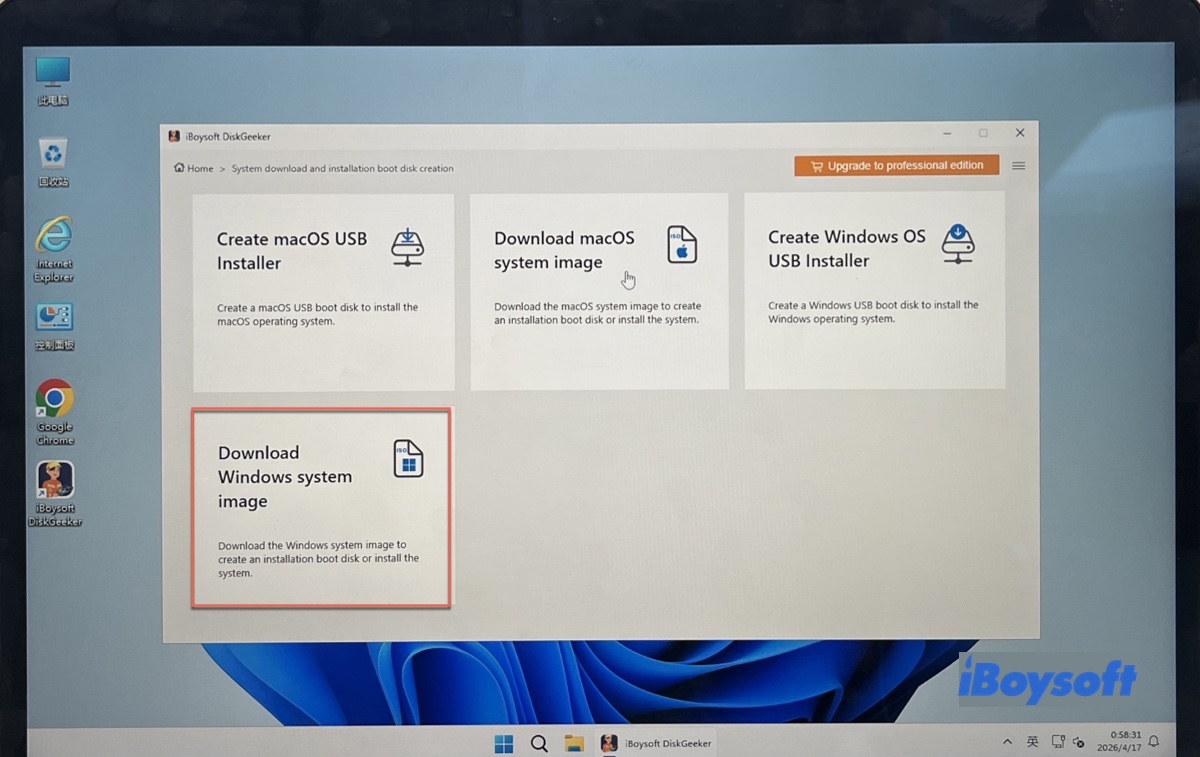
Step 2: Open Download and create boot disk > Download Windows system image.
Step 3: Select Windows 7 and choose SP1 (Build 7601), the preferred language, x64 (64-bit), and Ultimate.
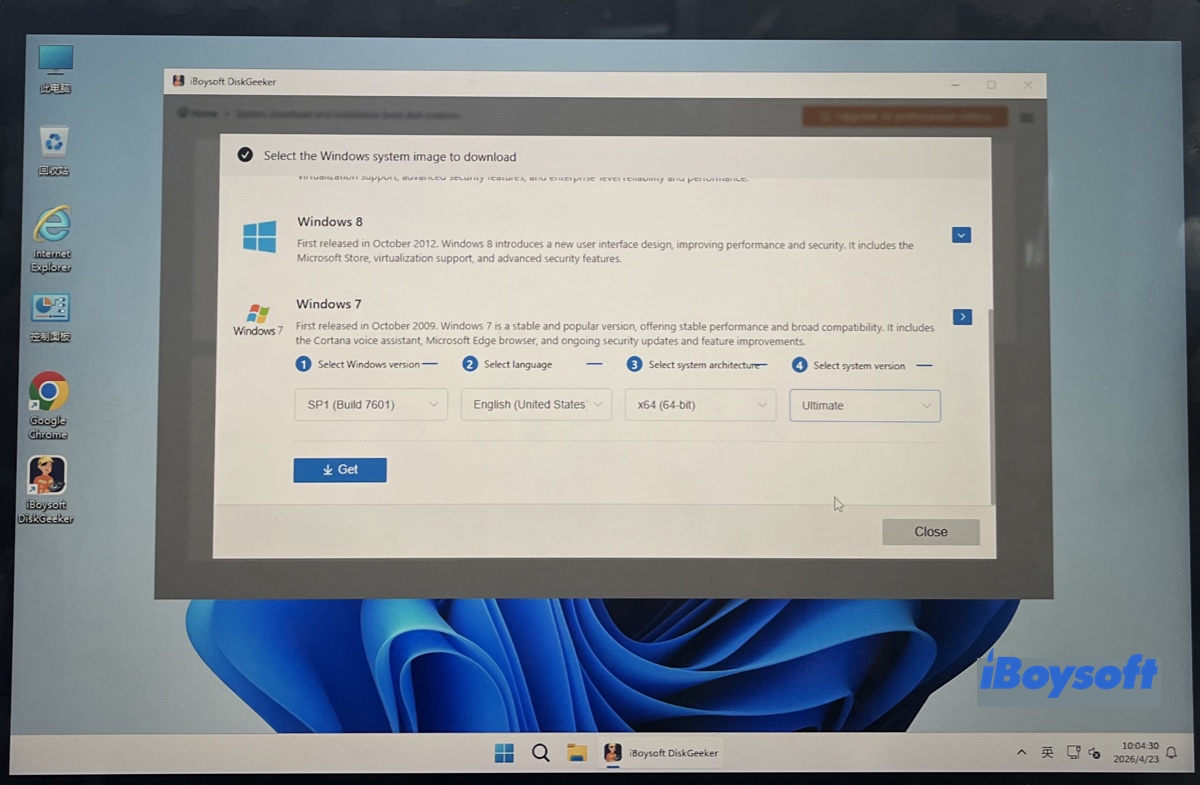
Step 4: Click Get and designate a location to save the ISO file.
Now, you should have a genuine Windows 7 Ultimate ISO file download (64-bit) released by Microsoft.
Windows 7 Ultimate 32-bit ISO file download free (x86)
If you have a legacy Windows PC that runs on 32-bit processors, you can free download the official Windows 7 Ultimate 32-bit ISO file directly with the following link:
Official Windows 7 Ultimate 32-bit Download SP1 ISO - DVD ⬇️
| Size: 2.38 GB |
| MD5: 2572274e6b0acf4ed1b502b175f2c2db |
| SHA-1: 65fce0f445d9bf7e78e43f17e441e08c63722657 |
| Source: archive.org |
* The uploader said this is an original MSDN file provided by Microsoft.
Share the link to free download the Windows 7 Ultimate x86 ISO file!
Windows 7 Ultimate 32/64-bit all-in-one ISO file download
If you want to dual-boot 32-bit and 64-bit versions of Windows 7 Ultimate, you should get the Windows 7 Ultimate 32/64-bit all-in-one ISO file. It's a single image file that contains all the necessary installation files to run Windows 7 Ultimate on both 32-bit and 64-bit computers.
Windows 7 Ultimate 32/64-bit all-in-one ISO file download (Pre-activated)
| File Size: 5.1 GB |
| Source: archive.org |
Windows 7 Ultimate product keys
Obtaining a legitimate Windows 7 Ultimate product key is challenging today, as Microsoft officially stopped selling it in January 2020. There are no official sources for new keys.
If you need a Windows 7 Ultimate product key, you can either recover an existing key, provided that your computer came with Windows 7 Ultimate or you purchased a physical retail copy previously, or get an old, unused one from a third-party reseller, which is rare and pricy.
Here's a list of Windows 7 Ultimate product keys that may work:
FJH38-9YYTR-3RHFDJ-KSFDH-PPTR5
DSLJK-HFZZY-5VVMN-5RR4D-KFHJD
HAADR-MMBN2-3GHHD-JSHER-UITY3
4EETX-KKPS5-9AASD-KSMZ2-HHT26
SSD78-49RPO-IREIU-T8967-KKTT7
ZM4MN-VJKD-FGHKJ-LSAJF-CCVY2
WEOPT-UIORE-TY896-7893-NCVM2
4BBWE-OP782-7IRPO-55WUI-RPIO7
22TJD-F8XRD6-YG69F-9M66D-PMJSM
342DG-6YJR8-X92GV-V8R4V-P6K27
EHY4Q-VB55H-XK8VD-5Y68P-RFQ43
P72CK-2Y3B8-YGHDV-293QB-QKJJM
GMJQF-JC7VC-76HMH-M4RKY-V4HX6
74T2M-DKDBC-788W3-H689G-6P6GT
MKD6B-HV23H-TMH22-WXG3P-TRVJM
2666Q-HGXKH-DFP6M-7YGBB-BQ7Q7
How to create a Windows 7 Ultimate bootable USB installer?
There are two ways to make a Windows 7 Ultimate bootable USB installer. Depending on your target computer (the PC you want to boot from the bootable USB), you can choose the most proper one.
① If the target Windows PC uses BIOS, you can run Windows 7 USB/DVD Download Tool to create a bootable USB installer for Windows 7 Ultimate.
It was the official Microsoft tool for efficiently creating a legacy bootable drive. Unfortunately, Microsoft no longer provides the official links to download it. This means you must obtain the tool from a third-party source.
② If the target PC uses the newer UEFI, which is on most modern computers, you'll need a reliable tool like iBoysoft DiskGeeker for Windows to create the Windows 7 Ultimate bootable USB installers. It can make a bootable Windows 7 Ultimate USB installer working for both BIOS and UEFI systems.
We've mentioned its ability to download different versions of Windows ISO files, including Windows 7 Ultimate 64-bit, in previous sections. But it's more than a Windows OS downloader; it also lets you make bootable installation media for Windows 7 Ultimate and other Windows versions.
Here's how to create the Windows 7 Ultimate bootable USB installer:
Connect a USB flash drive or any external disk with 10 GB or more free space to your Windows PC. Ensure all important data is backed up, as the drive will be erased.
Step 1: Install iBoysoft DiskGeeker for Windows.
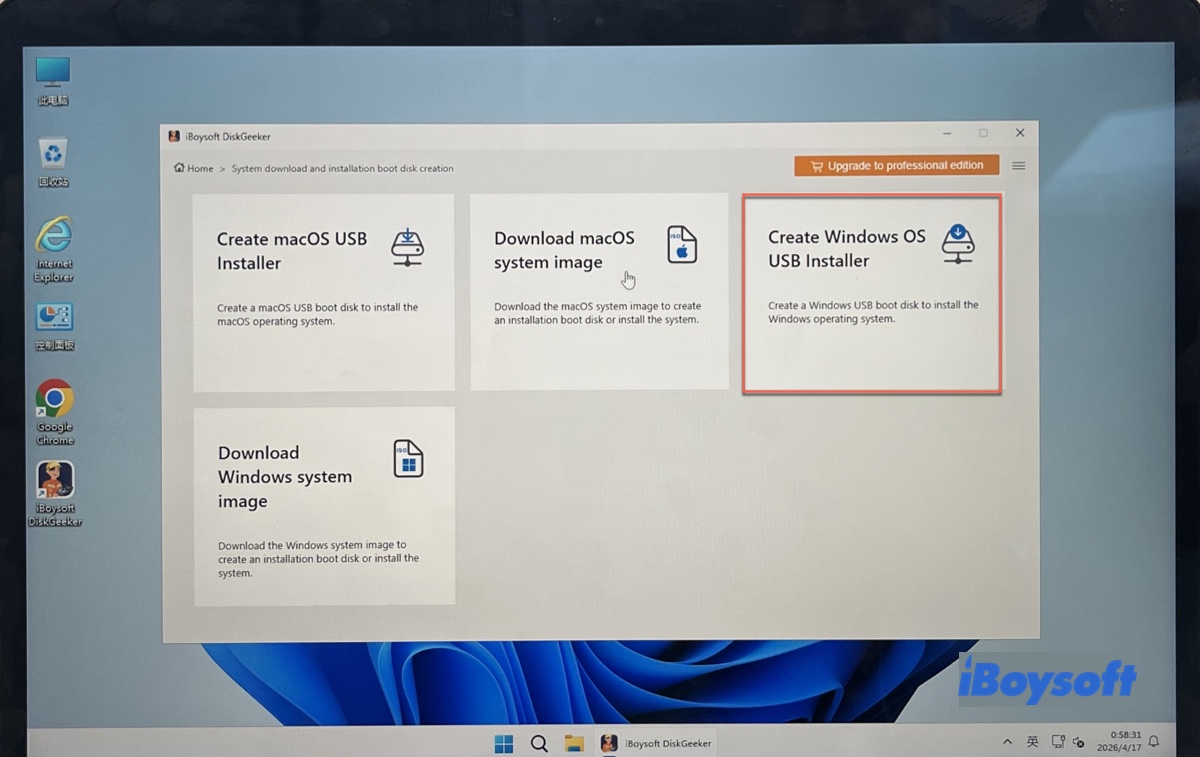
Step 2: Click on Download and create boot disk > Create Windows OS USB Installer.
Step 3: Choose the external drive and click Select.
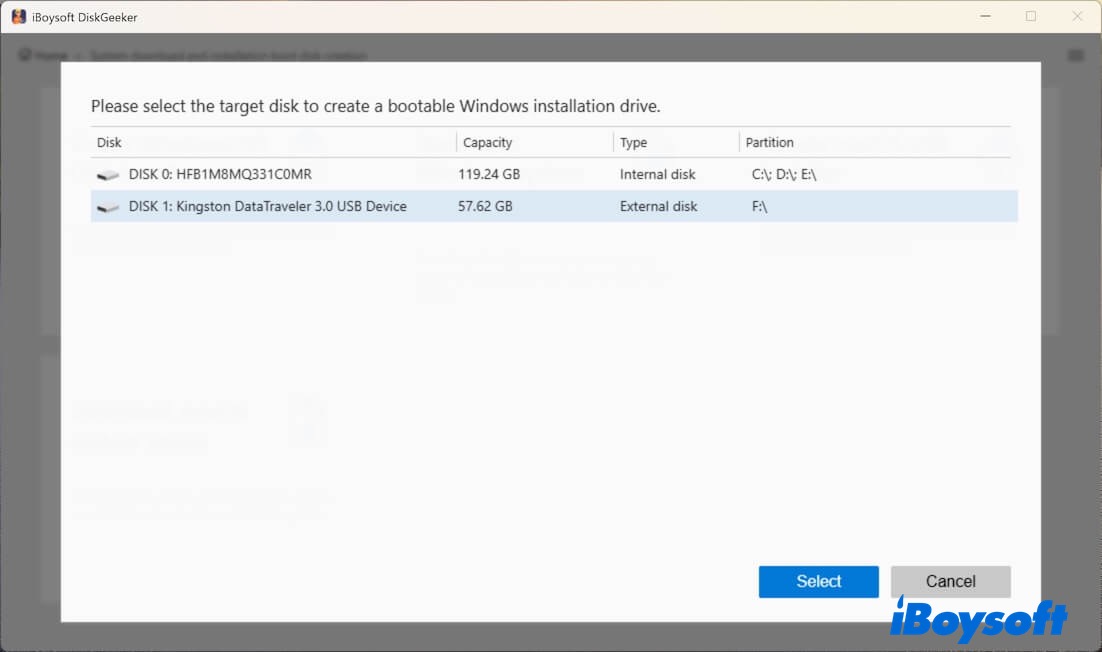
Step 4: Select Windows 7, then choose SP1, the desired language, 64-bit, and Ultimate. (If you have downloaded the Windows 7 Ultimate ISO file, click Select a local image to upload it.)
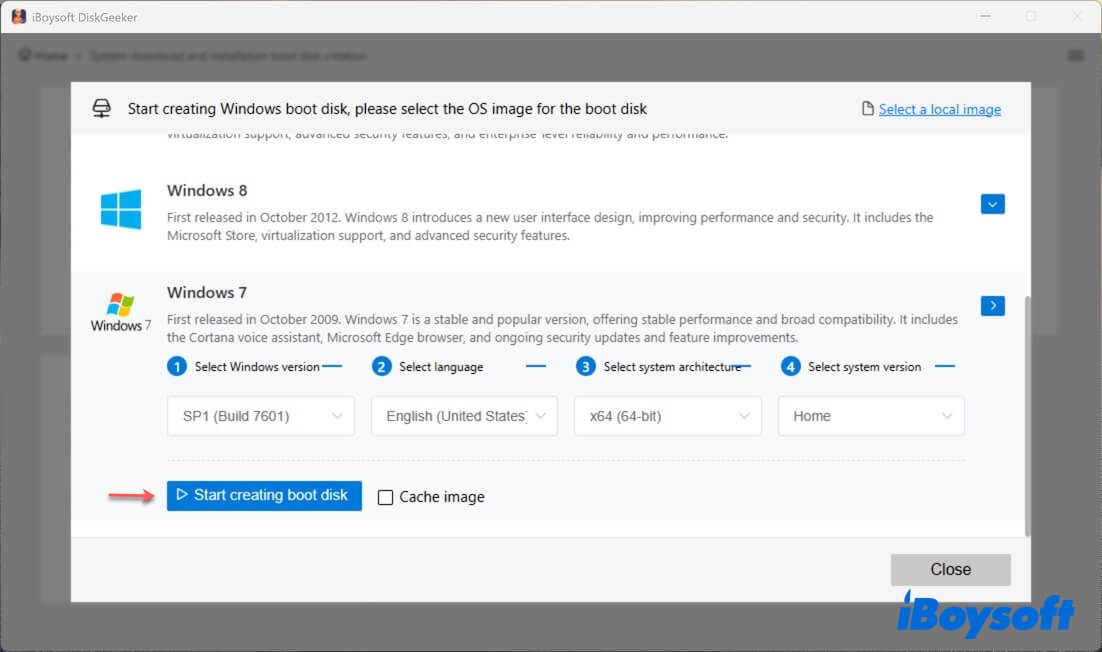
Step 5: Click on Start creating boot disk.
Step 6: It will automatically make the bootable USB installer after the Windows 7 Ultimate ISO is downloaded.
Creating a Windows 7 Ultimate USB installer is straightforward with this tool! Share it to benefit others!
To download other Windows versions: Windows 10 Pro, Home, Enterprise, & Education, Windows 10 Download, Windows 11 Download, Ghost Spectre Windows 11 Download, Old Windows ISO Download, Windows 2000 Download, Windows 98 Download.
FAQs about Windows 7 ISO file download Ultimate 32/64-bit
- QCan I still use Windows 7 Ultimate?
-
A
Yes, you can still use Windows 7 Ultimate. Although Microsoft has ended support for Windows 7 Ultimate in 2020, this operating system still functions. The problem is that it's no longer updated by Microsoft and is more prone to malware or malicious attacks than maintained systems.
- QCan I download Windows 7 Ultimate with SP1 32-bit ISO?
-
A
Yes, you can download Windows 7 Ultimate with SP1 32-bit ISO from Internet Archive or a reliable downloader like iBoysoft DiskGeeker for Windows.
- QHow to activate Windows 7 Ultimate 64-bit not genuine?
-
A
Windows 7 Ultimate has an initial 30-day grace period before activation is required. You could prolong the trial period to bypass activation. But you'll need a working product key to activate it eventually. If you can't get a product key, consider downloading a preactivated Windows 7 Ultimate ISO file if you're willing to try.
- QWhere is the best place to download Windows 7 iso?
-
A
Microsoft doesn't provide official links to download Windows 7 ISO files. So the best place to get such an ISO file is from a reliable third-party source. Internet Archive has many Windows ISO files. If you look carefully, you should find unmodified, genuine Windows 7 ISO files, as covered in this article. Still, if you want to absolutely sure the Windows ISO file is safe and legit, I suggest you use iBoysoft DiskGeeker for Windows.