Download Windows ISOs & Create Bootable USB Installers

Browse Windows download guides by version, compare official and alternative sources, verify the integrity, create bootable USB installers quickly (with iBoysoft DiskGeeker for Windows), and install. All in one place.

Official-source-first when available
Source type clearly labeled
Bootable installer creation guidance

Latest & Old Windows Downloads

Start with the Windows version you need. Each guide helps you:

  • Review available download sources
  • Choose your preferred download method
  • Verify the integrity of the ISO file
  • Create a bootable USB installer if needed
  • Install Windows
Windows 11
Windows 11
Release Date: October 5, 2021
Security Updates: Available
Windows 11 ISO Download Sources: Microsoft (official) and Internet Archive
System Requirements:
  • CPU: 1 GHz+, 2+ cores (supported list)
  • RAM: 4 GB
  • Storage: 64 GB
  • GPU: DirectX 12 / WDDM 2.0
  • Display: 720p+
  • Firmware: UEFI, Secure Boot, TPM 2.0
Windows 10
Windows 10
Release Date: Jul 29, 2015
Security Updates: No (Ended Oct 14, 2025)
Windows 10 ISO Download Sources: Microsoft (official) and Internet Archive
System Requirements:
  • CPU: 1 GHz
  • RAM: 1 GB (32-bit) / 2 GB (64-bit)
  • Storage: 16-20 GB
  • GPU: DirectX 9
  • Display: 800×600+
  • Firmware: BIOS or UEFI (not required)
Windows 8.1
Windows 8.1
Release Date: Jul 29, 2015
Security Updates: No (Ended Jan 10, 2023)
Windows 8.1 ISO Download Sources: Microsoft (official) and Internet Archive
System Requirements:
  • CPU: 1 GHz
  • RAM: 1-2 GB
  • Storage: 16-20 GB
  • GPU: DirectX 9
  • Display: 1024×768
  • Firmware: BIOS/UEFI (optional)
Windows 8
Windows 8
Release Date: Oct 26, 2012
Security Updates: No (Ended Jan 12, 2016)
Windows 8 ISO Download Sources: Microsoft (official) and Internet Archive
System Requirements:
  • CPU: 1 GHz
  • RAM: 1-2 GB
  • Storage: 16-20 GB
  • GPU: DirectX 9
  • Display: 1024×768
Windows 7
Windows 7
Release Date: Oct 22, 2009
Security Updates: No (Ended Jan 14, 2020)
Windows 7 ISO Download Source: Microsoft (official)
System Requirements:
  • CPU: 1 GHz
  • RAM: 1-2 GB
  • Storage: 16-20 GB
  • GPU: DirectX 9
Windows Vista
Windows Vista
Release Date: Jan 30, 2007
Security Updates: No (Ended Apr 11, 2017)
Windows Vista ISO Download Sources: Microsoft (official) and Internet Archive
System Requirements:
  • CPU: 800 MHz-1 GHz
  • RAM: 512 MB-1 GB
  • Storage: 15 GB
  • GPU: DirectX 9
Windows XP
Windows XP
Release Date: Oct 25, 2001
Security Updates: No (Ended Apr 8, 2014)
Windows XP ISO Download Sources: Microsoft (official) and Internet Archive
System Requirements:
  • CPU: 233 MHz
  • RAM: 64 MB
  • Storage: 1.5 GB
  • GPU: Basic graphics

Old Windows

Windows 2000 (NT 5.0), Windows ME (Millennium Edition), Windows 98 Second Edition (SE), Windows 98 (original), or earlier
Old Windows ISO Download Find all versions: Windows ISO Download

Why Use This Download Center

This Windows ISO download center gives you complete download-to-install workflow. Everything is covered in one place-no missing steps, no guesswork.

Version-Specific Download Guides

Our pages are organized by Windows version so you can quickly find the download guide that matches your installation goal.

Clear Source Information

Each guide explains the available source option and clearly labels the source type for better transparency.

ISO Integrity Verification

Verification methods are provided on each download page to ensure ISO files from alternative sources are intact, untampered, and match the expected checksum.

Built for Bootable USB Creation

This download center is designed not only to help you find an installer, but also to help you move on to bootable USB creation with iBoysoft DiskGeeker for Windows.

Step-by-step Installation Guide

In each guide, we offer detailed steps to install Windows with the bootable USB installer for a clean installation, system repair, system upgrade or downgrade, or more.

Download Windows and Create a Bootable Installer with iBoysoft DiskGeeker for Windows

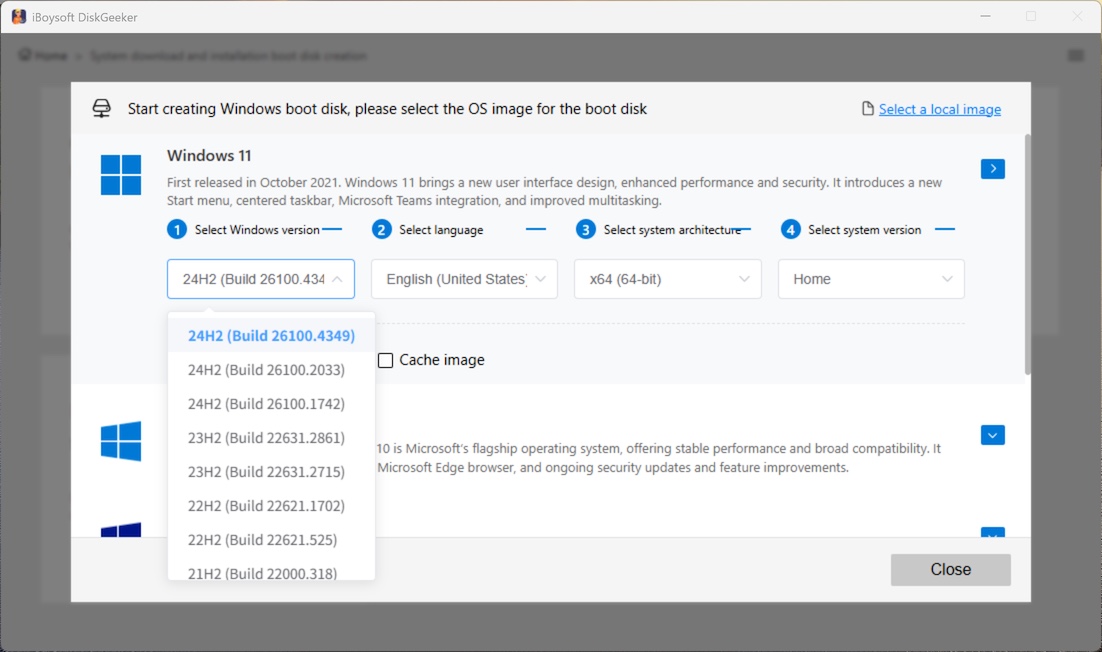
iBoysoft DiskGeeker for Windows helps you access additional download options for Windows 11, 10, 8, 7, and Server 2025, 2022, 2019 (and earlier) installers and automatically create bootable USB installers for installation or repair.

  • 1. Pick your OS versions.
  • 2. Download the image.
  • 3. Create the bootable USB installer.
All in one seamless workflow
iBoysoft DiskGeeker for Windows - Bootable USB Installer

FAQ

Are all download sources official?

We prioritize official-source-first guidance where available. When the official options are unavailable, other source options are recommended. The source type is clearly labeled on the page.

What does iBoysoft DiskGeeker for Windows do on this Windows ISO download guide?

It helps users access additional download options for Windows installers and quickly create bootable USB drives from downloaded files.

Can I use iBoysoft DiskGeeker for Windows to create a bootable USB installer?

Yes. It is used here as the tool for turning downloaded Windows installer files into bootable USB media.

Why is bootable USB creation included on this site?

Many users do not only need to download Windows. They also need a practical way to use the downloaded ISO file for installation or repair. That is why bootable USB creation is part of this workflow.